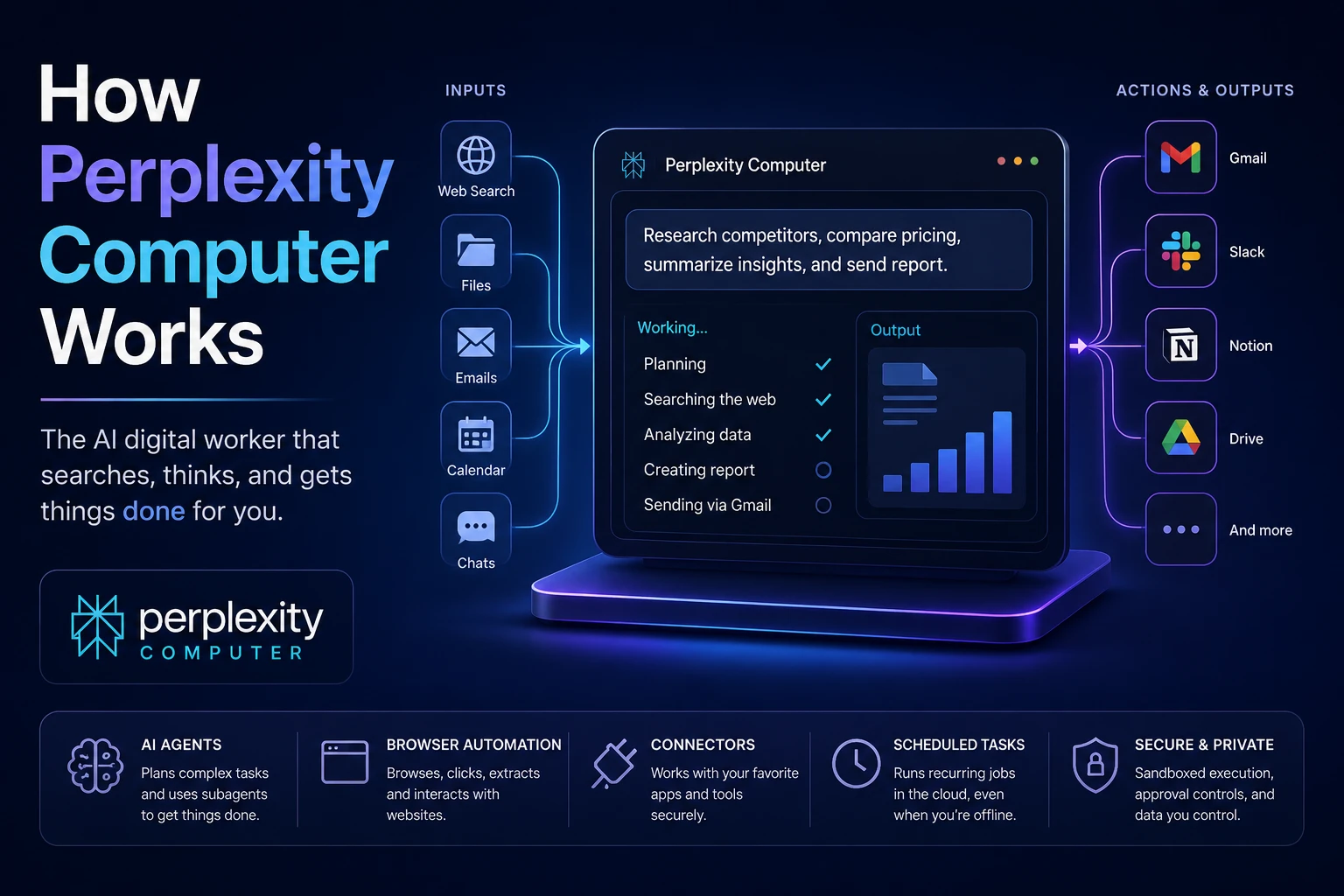

Perplexity Computer is not just another chatbot. It is Perplexity’s attempt to turn AI from an answer machine into a digital worker. Instead of only replying with information, it can research, browse, use connected apps, create documents, run scheduled tasks, and carry out multi-step workflows.
In simple terms, Perplexity Computer is an AI agent. An AI agent is a system that does not only generate text. It can plan a task, decide which tools are needed, use those tools, check the result, and continue working until the task is complete. Perplexity describes Computer as a general-purpose digital worker that operates many of the same interfaces a person would use.
This makes it different from normal Perplexity search. A normal Perplexity query might answer, “What are the top competitors in this market?” Perplexity Computer can go further: research the competitors, collect pricing, build a comparison table, create a report or slide deck, and potentially send it through a connected app.
Also Read: [ANALYSIS] How Perplexity AI Earns Money?
Perplexity vs Perplexity Computer vs Comet
To understand Computer, it helps to separate three related Perplexity products:
| Product | What it mainly does | Simple example |
|---|---|---|
| Perplexity | Searches, reasons, and gives cited answers. | “Explain the Indian EV market with sources.” |
| Comet | An AI browser that understands pages and tabs, and can help with browsing tasks. | “Summarize all my open tabs about this topic.” |
| Computer | An agentic worker that can plan and execute longer workflows across web, tools, files, and apps. | “Track these competitors every Monday and email me a summary.” |
So, the easiest way to think about it is this: Perplexity answers, Comet browses with you, and Computer works for you.
Also Read: [HOT] Can Perplexity Humanize AI Content?
The Basic Workflow: How Perplexity Computer Handles a Task
When you give Computer a task, it does not simply produce one answer immediately. It breaks the task into smaller pieces, chooses tools, and executes steps. A typical workflow looks like this:
You do not need to write code or fill a strict form. You might say: “Research 10 SaaS competitors, compare their pricing, make a table, and draft a summary.”
It identifies the goal, the required steps, the information sources, the tools needed, and whether the job is a one-time task or something that should run repeatedly.
For research-heavy work, it can search the web and open pages. For personal or company work, it can use connectors such as Gmail, Slack, Notion, Calendar, GitHub, Linear, Salesforce, Snowflake, and similar tools, depending on what you connect.
A subagent is like a smaller specialist inside the main agent. One subagent might research competitors, another might summarize documents, another might organize results, and another might prepare the final output.
The output may be an answer, table, report, slide deck, email draft, code, website, dashboard, or scheduled task.
For sensitive actions, such as sending messages or taking action inside connected accounts, human approval is important. Perplexity has also described approval gates, audit trails, and a kill switch for sensitive workflows in its Personal Computer announcement.
What Makes It “Agentic”?
A chatbot usually waits for the next message. It gives a response, then stops. An agent tries to move a task forward.
For example, suppose you ask:
“Find five AI writing tools, compare their pricing, check user complaints, and create a blog outline.”
A basic chatbot may give a generic list. Perplexity Computer can act more like a junior researcher. It can search current information, open relevant pages, extract details, compare findings, and assemble them into a usable format.
The “agentic” part comes from five abilities:
- Planning: breaking a large request into smaller tasks.
- Tool use: using web search, browser actions, files, apps, and data sources.
- Execution: not stopping at advice, but performing steps.
- Iteration: checking results and improving the output.
- Persistence: running longer jobs, scheduled jobs, or background monitoring.
Also Read: How Does Perplexity AI work? - A Deep Dive!
The Role of Search and Sources
Perplexity’s original strength is search-native AI. Computer builds on that. For research tasks, it can search the web, compare sources, and synthesize information instead of depending only on the model’s memory.
This matters because many business tasks need current information. Pricing pages change. Product features change. News changes. Financial data changes. Legal and compliance guidance changes. A normal AI model may be outdated, but a search-connected agent can look for fresh sources before creating its answer.
However, search does not automatically make an answer perfect. Web pages can be outdated, biased, promotional, incomplete, or wrong. A good agent must not only retrieve information, but also judge source quality, compare claims, and show where important claims came from.
Also Read: Perplexity AI vs. Jenni AI: Which One Is Worth It?
How Browser Automation Fits In
Browser automation means the AI can interact with websites in a browser-like environment. It may open pages, click through flows, read content, fill fields, collect information, and move between websites.
This is useful because much of modern work happens in browser interfaces. Pricing pages, dashboards, admin panels, forms, CRMs, email apps, project management tools, and analytics products are often web-based. If an AI can operate those interfaces safely, it can do more than answer questions.
For example, browser automation could help with:
- collecting pricing information from competitor pages,
- summarizing several open research tabs,
- filling repetitive forms,
- checking order status or flight status,
- extracting data from a webpage into a table,
- drafting replies based on email and calendar context.
This is also where risk increases. When AI can act inside a browser, a bad instruction hidden on a webpage may try to manipulate it. This is called prompt injection. It is one of the biggest security problems for AI agents and AI browsers.
Connectors: How Computer Works With Your Apps
Connectors are integrations between Computer and the apps you already use. Perplexity’s documentation mentions connectors for tools such as Gmail, Outlook, GitHub, Linear, Slack, Notion, Snowflake, Databricks, Salesforce, and others.
Without connectors, Computer can mostly use public web information and whatever files or instructions you provide. With connectors, it can work with private context, such as:
- emails,
- calendar events,
- team messages,
- project tickets,
- internal documents,
- databases and business tools.
This is powerful because the agent can understand your actual workflow. For example, it can prepare a meeting brief by checking your calendar, reading relevant emails, looking up the person you are meeting, and summarizing open tasks.
But connectors also raise privacy and permission questions. The more apps you connect, the more sensitive the agent’s working environment becomes. For this reason, users should connect only the tools they truly need and review permissions carefully.
Subagents: Why One AI Worker May Use Many Smaller Workers
Perplexity says Computer can deploy subagents. This is important because a complex task is rarely one single task.
Imagine this prompt:
“Analyze three competitors, compare their positioning, create a one-page report, and draft an email to my team.”
Internally, this can be split into smaller jobs:
- Research competitor websites.
- Collect pricing and feature information.
- Find customer reviews or complaints.
- Summarize patterns.
- Create a comparison table.
- Write a report.
- Draft an email.
A subagent system can assign different parts of the job to specialized assistants. One may focus on market research. Another may focus on financial or pricing analysis. Another may focus on writing the final document. A coordination agent can combine their work.
This does not mean the system is magical. It means the system is structured. Instead of one model trying to do everything in one response, the work is divided into stages.
Scheduled Tasks and Background Work
One major difference between Computer and a normal chatbot is background execution. Perplexity’s Scheduled Tasks documentation says Computer can run recurring work in the cloud, meaning your laptop does not need to stay open.
This turns Computer into a monitoring and reporting tool. Examples include:
- “Every weekday morning, summarize important AI news.”
- “Check my Gmail every hour for investor replies.”
- “Every Monday, pull sales pipeline updates and post a Slack summary.”
- “Track competitor pricing changes and notify me.”
- “Watch for new filings, product launches, or job postings.”
Perplexity says scheduled tasks can use the same agent system, tools, connectors, and subagents used in one-off Computer conversations. This is important because recurring work is often where automation becomes valuable.
Memory
Perplexity’s Help Center describes Computer as having persistent memory across sessions. In simple language, memory means the system can retain useful context instead of starting from zero every time.
This may include your preferences, long-running project context, repeated instructions, or details from previous work. For example, if you always want reports in a certain format, memory can reduce repetition. If you are tracking a market over weeks, memory can help the agent understand what changed since the last run.
Memory is useful, but it should be treated carefully. A system that remembers context can become more helpful, but it can also store information you may not want reused. Users should review available memory and privacy settings where possible.
Cloud Sandbox
Perplexity describes Computer as using a secure cloud or isolated sandbox. A sandbox is a controlled environment where the agent can run tasks separately from the rest of the system.
The goal of a sandbox is to reduce risk. If an agent is browsing, processing files, running code, or handling tool actions, the sandbox limits how much it can touch directly. In enterprise contexts, Perplexity says tasks run in a secure, isolated environment with persistent memory across sessions and platforms.
A sandbox does not remove all risk. It is one layer in a larger safety system. For high-risk tasks, a good setup also needs permission controls, approval steps, logging, restricted access, and clear user visibility into what the agent did.
What Perplexity Computer Can Be Used For
Perplexity Computer is mainly useful for tasks that combine research, repetitive steps, synthesis, and output creation. It is less useful when you only need a quick answer.
Where It Can Go Wrong
Perplexity Computer is powerful, but users should not treat it as fully reliable or fully autonomous for sensitive decisions. AI agents can make mistakes in several ways.
1. It may misunderstand the goal
If your prompt is vague, the agent may optimize for the wrong thing. For example, “find the best vendors” could mean cheapest, fastest, most reliable, highest rated, or best for enterprise use.
2. It may trust weak sources
Search-connected AI can still pick bad sources. It may summarize marketing pages as if they are neutral. It may miss newer data. It may fail to notice that two sources disagree.
3. It may take the wrong action
Tool-using agents can create, edit, send, schedule, or change things. If permissions are too broad, a small misunderstanding can have a larger impact.
4. It can face prompt injection attacks
Prompt injection happens when hidden or malicious text tells the AI to ignore the user’s real instruction and do something else. This is especially dangerous for browser agents because webpages, emails, comments, documents, and forms can contain text the user did not personally write.
Public security research on AI browsers, including Perplexity’s Comet, has shown that agentic browsers can be vulnerable to malicious instructions hidden in web content. This does not mean every task is unsafe, but it does mean users should be cautious when giving an AI agent access to email, shopping, banking, admin panels, or confidential business data.
Best Practices for Using Perplexity Computer Safely
- Start with low-risk tasks. Use it first for research, summaries, outlines, and drafts.
- Give clear instructions. Define the goal, sources, format, deadline, and what it should avoid.
- Limit app permissions. Connect only the tools needed for the workflow.
- Review before sending or publishing. Do not allow important emails, posts, reports, or code changes to go out unchecked.
- Check sources. For factual claims, ask for citations and verify the most important ones yourself.
- Avoid sensitive workflows early. Be careful with banking, purchases, private documents, legal work, medical information, and production systems.
- Use scheduled tasks carefully. Monitor what recurring tasks are doing and remove the ones you no longer need.
Simple Example: A Competitor Research Workflow
Let’s say you run a SaaS product and want weekly competitor research. You could ask:
“Every Monday morning, check these five competitor websites, note pricing changes, summarize new features, find recent customer complaints, and email me a short report.”
Here is how Computer might process that:
- Identify the five competitors.
- Visit their websites and pricing pages.
- Search for recent news, changelogs, reviews, and complaints.
- Compare current findings with previous memory or previous reports.
- Create a short summary with changes and links.
- Draft or send the report depending on permissions.
- Repeat the workflow every Monday.
This is the real promise of Perplexity Computer: not just answering one question, but carrying a workflow forward over time.
Is Perplexity Computer a Real Computer?
The name can be confusing. For most users, Perplexity Computer is not a physical laptop or desktop sitting in front of you. It is a cloud-based agentic system that can use digital tools and interfaces.
Perplexity has also announced a related concept called Personal Computer, described as an always-on AI running with a dedicated Mac mini and connected to local files, apps, and sessions. That is a more literal “computer” concept, but the broader Perplexity Computer product is best understood as an AI worker that operates through cloud infrastructure and connected tools.
Final Verdict
Perplexity Computer is part of a larger shift from chatbots to AI workers. A chatbot gives answers. An AI worker can plan, search, browse, use tools, create outputs, and run recurring tasks.
Its biggest strength is workflow composition. A single instruction can combine research, analysis, document creation, app actions, and follow-up scheduling. That is much more useful than asking separate questions one by one.
Its biggest risk is the same thing that makes it powerful: action. Once an AI can use tools, browse websites, connect to accounts, and work in the background, mistakes and security issues matter more. Users should treat it like a capable assistant, not an unquestionable authority.
The best way to use Perplexity Computer is to give it structured, repeatable, research-heavy work while keeping human review for anything sensitive. Used that way, it can save time on tasks that normally require searching, copying, comparing, summarizing, formatting, and following up manually.
Sources and Further Reading
- Perplexity Computer official product page
- Perplexity Help Center: What is Computer?
- Perplexity Help Center: Scheduled Tasks in Computer
- Perplexity Help Center: Computer for Enterprise
- Perplexity Comet official page
- Brave Security: Indirect Prompt Injection in Perplexity Comet
- Guardio Labs: Scamlexity and agentic browser risks
```