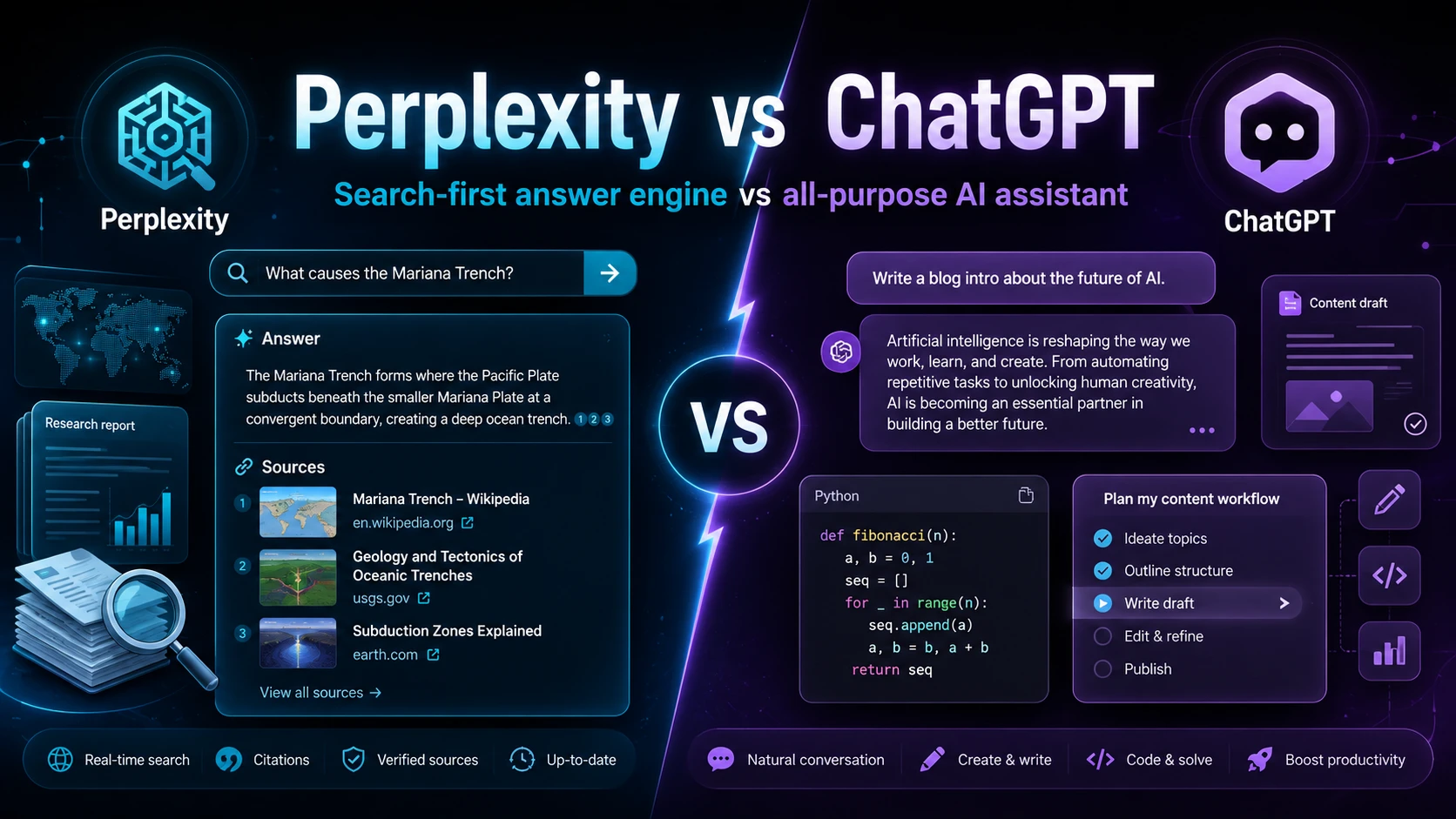

Perplexity and ChatGPT are often compared because both can answer questions, explain topics, summarize information, write content, and help with research. But they are not built around the same core idea. Perplexity is best understood as an AI answer engine: it searches the web, gathers information from sources, and gives a direct answer with citations. ChatGPT is best understood as a general-purpose AI assistant: it can search, but it is also designed for writing, coding, brainstorming, file analysis, project work, images, apps, memory, and agent-style tasks. Perplexity Help Center Perplexity Answer Engine ChatGPT OpenAI Help Center
The simplest difference is this: Perplexity starts from search, while ChatGPT starts from conversation. Perplexity asks, “What information can I find and cite for you?” ChatGPT asks, “What task can I help you complete?” This difference affects the interface, the answer style, the source handling, the pricing value, and the best use cases for each tool.
Also Read: How Perplexity Computer Works: A Simple Explanation
Quick Comparison: Perplexity vs ChatGPT
| Feature | Perplexity | ChatGPT |
|---|---|---|
| Main identity | AI search engine and answer engine. | General AI assistant and chatbot. |
| Best for | Fast web research, current information, source-backed answers, fact-checking. | Writing, coding, reasoning, file analysis, tutoring, planning, creative work, and long conversations. |
| Citations | Citations are central to the product and usually visible in answers. | Citations appear mainly when using search, deep research, or connected sources. |
| Search behavior | Search is the default experience. | Search is one tool inside a larger assistant experience. |
| Workspace features | Threads, Spaces, Research mode, internal knowledge search, and asset creation. | Chats, Projects, Memory, GPTs, file analysis, apps, image generation, and agent mode. |
| Best user type | Someone who wants quick, cited answers from the web. | Someone who wants an AI assistant for many different tasks. |
1. Perplexity Is Search-First
Perplexity describes itself as an AI-powered search engine that helps users discover and interact with information. Its own explanation says that when a user asks a question, Perplexity searches the web, identifies relevant sources, and synthesizes information into a clear answer. That means the product is designed around retrieval: finding information first, then using AI to organize and explain it. What Is Perplexity? What Is an Answer Engine?
This is why Perplexity often feels closer to Google Search than to a normal chatbot. You ask a question, it searches, it summarizes, and it gives links to sources. You can ask follow-up questions, but the basic workflow remains research-oriented. It is built for people who want to move from question to cited answer quickly.
Perplexity’s Pro Search and Research mode make this even clearer. Pro Search is designed for more detailed searches, while Research mode is built for deeper multi-source investigation. These features are not side tools; they are part of Perplexity’s main identity as a research and answer engine. Perplexity Pro Search Perplexity Research Mode
Also Read: [ANALYSIS] How Perplexity AI Earns Money?
2. ChatGPT Is Assistant-First
ChatGPT, on the other hand, is not mainly a search engine. OpenAI presents ChatGPT as an AI chatbot for everyday use. It can answer questions, explain ideas, help with writing, write and debug code, analyze files, generate images, use apps, remember useful context, and work inside Projects. Search is important, but it is only one feature inside the larger assistant experience. ChatGPT ChatGPT Search Projects in ChatGPT
This is why ChatGPT usually feels more flexible. You can use it like a tutor, editor, programmer, business assistant, analyst, writing partner, or brainstorming partner. It is not only trying to answer a question from the web. It is trying to help you complete a task, even when that task does not need web search at all.
For example, if you ask ChatGPT to rewrite a paragraph, explain a Java algorithm, create a Python script, analyze a CSV file, plan a learning schedule, or help draft a blog post, it can do that without needing to search the web. Perplexity can also help with many of these tasks, but ChatGPT’s product design is more naturally suited to long, multi-step assistant workflows.
3. Citations Are More Central in Perplexity
The biggest practical difference is citations. Perplexity is designed to show where information comes from. Its help center explains that it gives answers backed by sources, and its answer-engine model is built around searching and synthesizing information from trusted sources. This makes Perplexity useful when you need to verify claims, compare sources, or quickly check whether an answer is grounded in real pages. Perplexity Help Center Perplexity Answer Engine
ChatGPT can also cite sources when it uses web search or deep research. OpenAI’s documentation says ChatGPT Search can provide timely answers with links to web sources, and Deep Research can create structured reports with citations or source links. However, citations are not always part of every normal ChatGPT conversation. In a normal chat, ChatGPT may answer from model knowledge, reasoning, or user-provided context without showing source links unless search or research is being used. ChatGPT Search Deep Research in ChatGPT
This matters for students, researchers, bloggers, journalists, and analysts. If your main concern is “Where did this claim come from?”, Perplexity’s default style is more convenient. If your main concern is “Help me create, reason, write, or solve something,” ChatGPT’s broader assistant behavior may be more useful.
Also Read: How Does Perplexity AI work? - A Deep Dive!
4. Perplexity Is Better for Quick Current Research
Perplexity is usually more natural when the topic depends on recent information. For example, if you want to know the latest pricing of a SaaS tool, recent product changes, current company news, recent scientific discussions, or updated market data, Perplexity’s search-first design is a good fit. It is built to retrieve current pages and show the sources behind the answer.
ChatGPT can also search the web, but the experience is different. In ChatGPT, search is a capability inside a broader chat interface. That can be powerful because you can combine search with writing, analysis, planning, and file uploads. But for a simple “find the latest information and cite it” task, Perplexity often feels faster and more direct.
This is also why many people use both tools together. They may use Perplexity to collect and verify sources, then use ChatGPT to turn that research into a blog post, report, script, outline, or explanation.
5. ChatGPT Is Better for Writing, Coding, and Long Workflows
ChatGPT’s strength is not just answering questions. It is strong at working through multi-step tasks. OpenAI’s documentation describes features like Projects, Memory, data analysis, GPTs, apps, and agent mode. These features make ChatGPT more like a workspace than a search engine. Projects in ChatGPT Memory FAQ Data Analysis with ChatGPT GPTs in ChatGPT
Projects allow related chats, files, and instructions to stay together. Memory can help ChatGPT remember useful details across conversations when enabled. Data analysis lets ChatGPT work with uploaded files and create tables, charts, or calculations. GPTs allow custom versions of ChatGPT for specific tasks. These features are important because they turn ChatGPT from a question-answering tool into a general work assistant.
For coding, ChatGPT is often the better fit because the conversation can stay focused on debugging, explaining logic, refactoring, testing, and improving code over multiple turns. Perplexity can help with coding questions too, especially when you want sources or documentation, but ChatGPT’s assistant-style conversation is usually more comfortable for iterative coding help.
6. Perplexity Uses a Multi-Model Approach
Perplexity gives paid users access to multiple advanced AI models from different providers. Its help center states that subscriptions can include models from companies such as OpenAI and Anthropic, along with other proprietary and open-source models. This means Perplexity is not only one model. It is more like a search and answer layer that can route work through different models. Perplexity Advanced Models
ChatGPT mainly uses OpenAI’s own model ecosystem. That gives ChatGPT a more integrated product experience because the models, tools, memory, projects, apps, and agent features are all designed inside the OpenAI environment. The trade-off is that Perplexity may feel more model-flexible, while ChatGPT may feel more unified and consistent.
7. Both Have Deep Research, But the Philosophy Is Different
Perplexity’s Research mode is designed to conduct in-depth research and analysis on behalf of the user. Its advanced deep research update also emphasizes better accuracy, expanded capabilities, uploaded-document processing, and improved research workflows. This fits Perplexity’s identity: search deeply, collect sources, and produce a sourced answer. Perplexity Research Mode Advanced Deep Research
ChatGPT’s Deep Research is also built for complex online research. OpenAI describes it as a feature that can reason, research, and synthesize information into a documented report with citations. The difference is that ChatGPT’s research sits inside a broader assistant environment. It can be combined with user files, connected apps, and follow-up tasks inside the same assistant workflow. Deep Research in ChatGPT Apps and Connectors in ChatGPT
So Perplexity’s deep research feels like an advanced search product. ChatGPT’s deep research feels like one mode inside a larger assistant. If you mainly want a research report with source links, Perplexity is very natural. If you want research plus writing, rewriting, data analysis, file work, and follow-up execution, ChatGPT may be better.
8. Perplexity Has Threads and Spaces; ChatGPT Has Chats and Projects
Perplexity organizes work through Threads and Spaces. A Thread is like a continuing conversation around a question or topic. Spaces help individuals and teams organize research and collaborate around files, threads, and knowledge. Perplexity also offers internal knowledge search for enterprise workflows, allowing users to search across internal sources and web sources. Perplexity Threads Perplexity Spaces Internal Knowledge Search
ChatGPT organizes long-running work through chats and Projects. Projects can keep related conversations, uploaded files, and custom instructions together. This is useful for ongoing work such as writing a website, managing a coding project, studying a subject, analyzing trading data, or preparing a long research article. Projects in ChatGPT
The difference is subtle but important. Perplexity’s organization system is research-centered. ChatGPT’s organization system is task-centered. Perplexity helps you organize information. ChatGPT helps you organize work.
9. Privacy and Data Controls Differ
Both platforms provide privacy and data controls, but users should read the current policies before uploading sensitive information. OpenAI says individual ChatGPT users can control whether their content is used to improve models, while business and enterprise data is not used to train models by default. OpenAI Data Controls OpenAI Business Data Privacy
Perplexity says AI data retention is enabled by default for Free, Pro, and Max users, but users can control this setting. It also states that enterprise data is not used for AI training purposes, and that third-party model providers are prohibited from training on Perplexity data. Perplexity Data Collection Third-Party Model Provider Policy
The practical advice is simple: do not paste confidential business documents, private medical records, financial details, passwords, or legal documents into either tool unless you understand the plan, retention settings, and privacy controls you are using.
10. Pricing Is Similar at the Main Paid Tier
Both tools have a popular paid tier around $20 per month. ChatGPT Plus is listed at $20 per month, while Perplexity Pro is also commonly positioned around $20 per month or $200 per year. Both platforms also have higher-tier plans for heavier users and business users. Because pricing and plan limits change over time, users should always check the official pricing pages before subscribing. ChatGPT Pricing Perplexity Pricing Perplexity Max
The better value depends on your use case. If you mostly want fast research with citations, Perplexity Pro may feel more valuable. If you want one AI tool for writing, coding, data analysis, file uploads, images, custom GPTs, and general productivity, ChatGPT Plus or Pro may feel more valuable.
11. Which One Is More Accurate?
There is no simple answer. Perplexity may feel more accurate for current factual questions because it searches and cites sources by default. But a cited answer can still be wrong if the source is weak, outdated, misunderstood, or selectively summarized. ChatGPT can be very strong at reasoning, explanation, coding, and synthesis, but if it answers without search, it may rely on model knowledge that can be outdated or incomplete.
The right way to think about accuracy is this: Perplexity gives you more visible source grounding by default, while ChatGPT gives you broader reasoning and task support. For high-stakes topics such as health, law, finance, or academic work, you should verify important claims from primary sources no matter which tool you use.
12. When You Should Use Perplexity
Use Perplexity when you need source-backed answers quickly. It is especially useful for checking current information, comparing products, researching companies, finding recent articles, summarizing news, scanning academic topics, and collecting links for further reading. It is also useful when you want the answer to show its sources without asking for citations separately.
Perplexity is also a good fit when your workflow starts with uncertainty. For example, if you do not know which sources matter yet, Perplexity can help you map the topic quickly. It can give you a starting answer, show sources, and let you keep asking follow-up questions.
13. When You Should Use ChatGPT
Use ChatGPT when you need help doing something, not just finding something. It is better for drafting blog posts, rewriting content, writing code, debugging code, explaining algorithms, planning projects, creating outlines, analyzing uploaded files, generating tables, preparing study material, and continuing a long task across multiple turns.
ChatGPT is also better when you need a flexible thinking partner. For example, if you are building a website, writing a technical article, analyzing a trading report, learning a programming concept, or preparing a business plan, ChatGPT can stay with the task and help improve it step by step.
Final Verdict
Perplexity and ChatGPT overlap, but they are not the same kind of product. Perplexity is an AI answer engine built around search, sources, and fast research. ChatGPT is a general AI assistant built around conversation, reasoning, writing, coding, files, tools, and long workflows.
Choose Perplexity if your main need is: “Give me the latest answer and show me where it came from.” Choose ChatGPT if your main need is: “Help me think, write, code, analyze, create, and complete tasks.”
The best setup for many users is to use both: Perplexity for source discovery and fact-checking, ChatGPT for turning that information into useful work.